Two doors, one bolted. Six of them armed, and only the big one knew how to stand. He put his back to the wall out of habit and counted the seconds it would take to reach the yard.
Notices: exits, sightlines, who has trained
For authors who take their craft seriously
Write chapters with every character, place and plot thread a click away. New Quest checks new scenes against what you have already recorded, whether it happened in chapter four or book two, and flags possible slips before your readers find them.
Free for 30 writing days, saved to your account. No AI needed.
Or write with no account: your book stays in this browser. Copy it to Cloud later if you want.
What a continuity check looks like: a new draft brings back an innkeeper your notes say died in chapter 4, and New Quest flags it for you to look at.
Kaelen returns to The Salted Crow. What has changed?
The innkeeper looked up from the bar and smiled. Hesper reached for his usual cup before he had finished crossing the room. "Back so soon," she said.
Possible contradiction. Your notes say Hesper died in chapter 4, and the inn burned down with her.
Hesper · The Salted CrowHalf the roof was open sky. Kaelen set two coins down on what was left of the bar, the way Hesper would have made him, and nobody came to take them.
Cited: event evt_0f21 · "The Salted Crow burns" · chapter 4
Illustrative example. The check flags; you decide what the scene needs and choose the words.
Coming from Scrivener, Obsidian, World Anvil or Campfire? See how they compare.
What you get
All of it works today in your browser. Only the last line involves AI, and it is optional.
What gets in the way
A document for the draft, a wiki for the world, a spreadsheet for who knows what, and a notes app for everything else. Writers describe the same few problems again and again, in their own words. New Quest is built around them.
How it works
Your manuscript comes first. Story facts, lessons and checks support it. Build the parts you need as you go, then return to writing.
Start from an idea, a scene or a finished draft. Import a Word manuscript and its chapters, headings, bold and italics come with it. Anything that did not come across is listed, and your original file is kept.
Draft in chapters and scenes. Characters, places and recorded events for the scene you are on stay within reach. Try an alternative draft of a scene without touching the main one. When a question comes up, the craft lessons are there.
Check a draft against your story facts. Send chapters to private readers and collect their comments in one place. Then prepare the manuscript as Word, EPUB or PDF with a page preview. You decide which changes belong in the book.
Character Lens
Before you write a scene, ask who is looking. What do they want, what do they notice, what have they not learned yet? Character notes hold the answers. A soldier and a thief enter the same tavern, and their attention goes to different places. This is a craft choice you make, not an automatic rewrite.
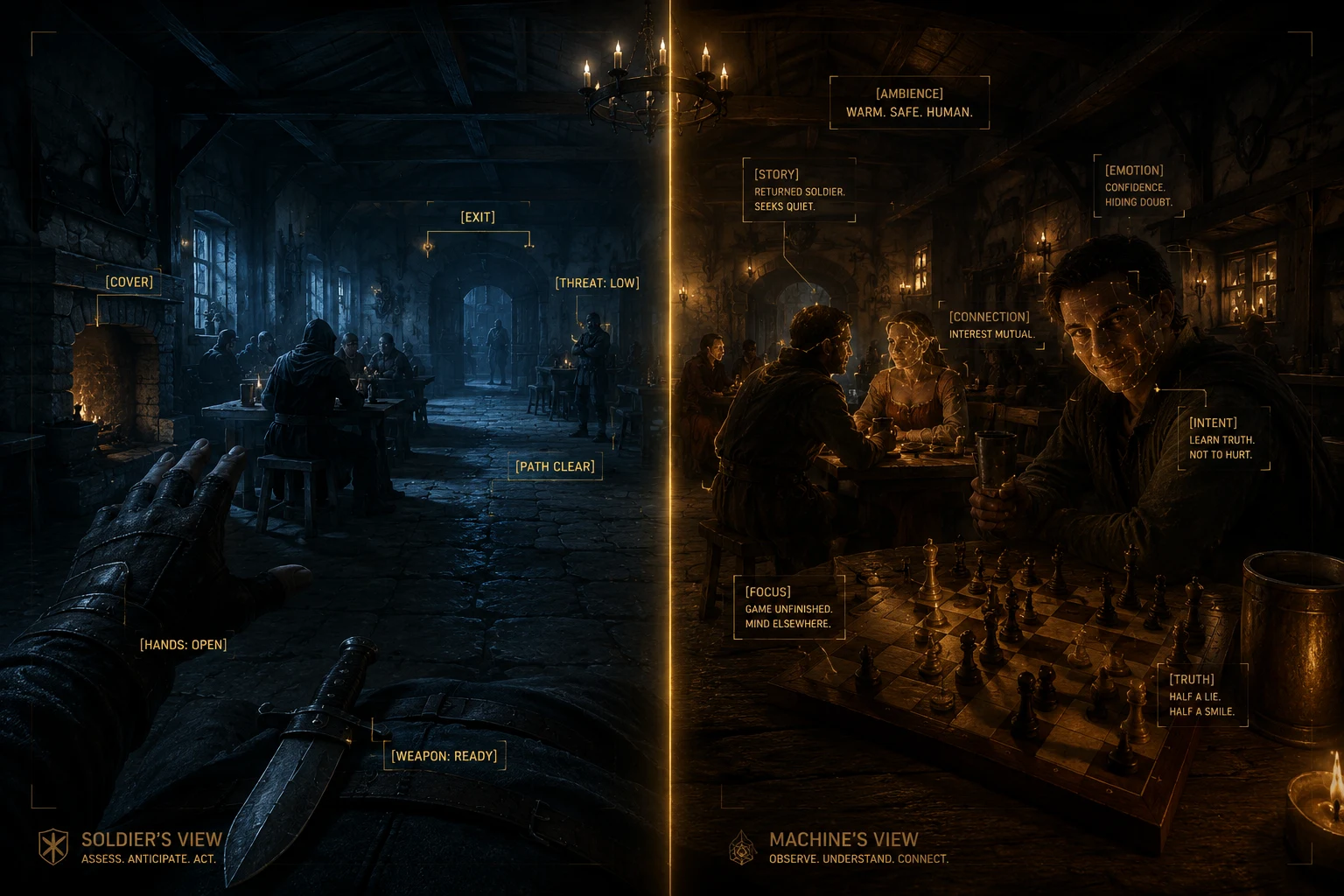
Same sceneThe Ashfall tap room, second bell. Twelve strangers.
Two doors, one bolted. Six of them armed, and only the big one knew how to stand. He put his back to the wall out of habit and counted the seconds it would take to reach the yard.
Notices: exits, sightlines, who has trained
Four purses worth the walk, one worth the risk. The floorboard by the hearth sang under boots, so she stepped around it, smiled at the man watching her, and let him think he was the one watching.
Notices: purses, loose boards, who is watching
Craft checks
A useful piece of guidance gives you something to try. What changes during this scene? What does the viewpoint character notice? Is this explanation doing work the action could do? Explore the principle, follow its named craft source and test it in a passage of your own.
The field guide and original exercises draw on craft writers including Swain, McKee, Le Guin and Browne and King. They are starting points for practice, not rules that grade your talent. Keep what helps. Read the original books when you want to go deeper.
Optional: your own AI
Plenty of writers want no AI near their book, and New Quest works fully without it. If you already use one, you can connect it to your book. It helps you write without doing the writing: it explains your own story back to you while you draft, so you stay in the scene instead of leaving it to hunt through notes.
Ask it while you write
It reads and suggests. It cannot change a word. New Quest's server refuses every change a connected AI asks for, so this does not rely on the AI behaving well. Your manuscript and story notes change only when you change them.
Off until you allow it. AI access starts off for every book. Allow it for one book in that book's settings, and turn it off again whenever you like.
No AI credits. We don't sell AI or charge for it. Connect the plan you already pay for; your provider's terms apply. We never train AI on your book, and New Quest's servers never call an AI model.
Included in the free trial and on Cloud.
claude mcp add --transport http --scope user new-quest https://mcp.newquest.app/mcpWorks with
And any app that supports MCP connections. ChatGPT needs a paid plan and developer mode, on the web. Gemini works through the Gemini CLI, and in the Gemini app for personal accounts in the US.
The Guild
The Guild is our free community for fiction writers. Bring a scene, a question or a problem you are working through. First-time novelists and experienced writers are welcome, with or without AI. The First Quest and Long Quest lessons are released as they are ready. Check the classroom and calendar for what is available now.
Join the Guild on Skool →Free to join. New Quest Cloud is a separate option.
Built in public
I'm Louis, an ex Royal Marine turned engineer, writing my first progression novel and building New Quest in public. The point is to make a place I want to return to for my own book. Follow the work, try the techniques and tell me what gets in your way.
Watch the build →Pricing
Freein this browser
Your book stays in this browser. Copy it to Cloud later if you want. Clearing the browser's site data removes it, so back up the library to a file.
$0for 30 writing days
30 writing days, not consecutive calendar days. Your saved work stays readable and exportable after the trial.
$8/month
Or $79 a year. No AI credits included or required. Cancel any time.
With no account, your book stays in the browser you wrote it in. The free trial and Cloud save it to your account, so it opens in any browser you sign in to. Connecting your own AI works on the trial and on Cloud, on your provider's plan. The desktop app is in testing and will be free. The Guild is free whichever you choose.
FAQ
No. Writing, story planning and learning do not require an AI account. Use assistance for the tasks you choose, or write every word yourself. Neither choice makes you more or less of an author.
New Quest is an author-first writing studio. Its purpose is to help you develop your craft and your manuscript. Optional assistance can support that work, but the ideas, judgement and decisions remain yours. We do not promise a finished book at the press of a button.
No. New Quest does not use your manuscript to train AI models. If you connect your own AI, what it reads goes to that provider under its terms and data settings, so check them. Saving to your New Quest account and allowing AI access are separate choices. Our privacy policy explains how we handle your data.
Claude, Claude Code, ChatGPT (developer mode, paid plans, on the web), Gemini (the Gemini CLI, and the Gemini app for personal accounts in the US), Codex, Cursor and OpenCode, and any app that supports MCP connections. The connect guide has the exact steps for each. The connection is included in the free trial and on Cloud.
No. The connection is read-only. Your AI can read the books you allow, check a draft against your story facts and suggest changes in the conversation. Anything that goes into the manuscript, you put there.
Yes. Fiction is our focus, from a first novel to a long-running series. Fantasy, LitRPG and progression fiction have extra depth, but their game mechanics are optional. You do not need levels, spells or a stat block to write here.
You can draft nonfiction prose, and scene-based tools can suit memoir and narrative nonfiction. New Quest is currently fiction-first. A complete citations, footnotes, bibliography and specialist nonfiction formatting workflow is not available yet.
No. Start writing whenever you are ready. The field guide and exercises are there when a question comes up. The Guild offers a place to discuss the work, and course lessons are released as they are ready. Learning is an option, not an onboarding requirement.
No. We do not sell AI credits, and Cloud does not include model usage. A connected tool runs on your own Claude, ChatGPT or other provider plan, within that plan's limits and charges.
With an account, on the free trial or Cloud, it saves to New Quest as you write and opens in any browser you sign in to. With no account, it stays in the browser you wrote it in: copy it to Cloud later if you want, and back it up to a file, because clearing the browser's site data removes it. Either way, export the whole book whenever you like.
Today: writing in your browser with no account, the free trial and Cloud with your books saved to your account, and connecting your own AI. Still in testing: the desktop app, the Pocket phone app and an AI assistant built into New Quest. Choose Cloud for what works today, not for what is coming.
A free toy that got out of hand. Build and share book tier lists at newquest.app/tierlist, no signup needed.
Your next scene is a good place to start.
Start writing